When you need to check the multiple conditions in PowerShell, we must use the Switch statement.
This statement in PowerShell is equivalent to the series of ‘If‘ statements, but it is simple to use. This statement lists each condition and the code of block associated with each condition. If a condition is ‘True‘, then the block of code is executed with that particular condition.
Syntax of Switch Statement
Switch (<test-expression>)


    <condition1> { Code of Block-1 ; break }

    <condition2> { Code of Block-2 ; break }

    <condition3> { Code of Block-3 ; break }

     .

     .

     .

    <condition3> {Code of Block-N ; break }
The following are the rules apply to the switch statement:
- The default statement is optional. Even if this statement does not have a default statement, it would execute without any problem.
- The test_expression can be a logical or an integer expression.
- If a break statement is applied to any case, then the switch statement is terminated by the break statement after that case.
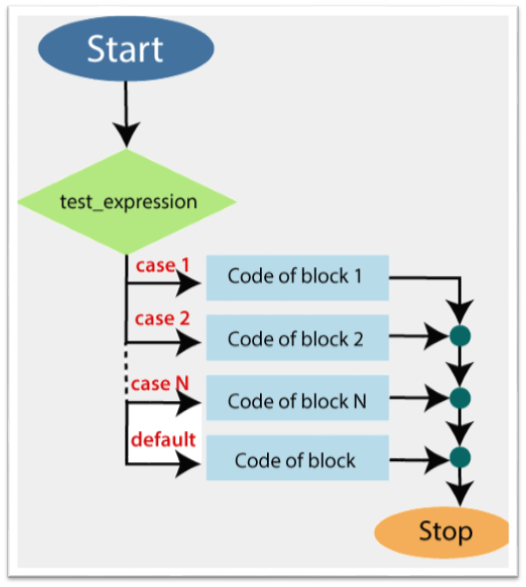
Flowchart of Switch Statement
Examples
The following examples describe how to use the switch statement:
Example 1: In this example, the value of the day matches one of the numeric values.
PS C:\> $day=3

PS C:\> switch($day)

>> {

>> 1{echo "The day is Sunday"}

>> 2{echo "The day is Monday"}

>> 3{echo "The day is Tuesday"}

>> 4{echo "The day is Wednesday"}

>> 5{echo "The day is Thursday"}

>> 6{echo "The day is Friday"}

>> 7{echo "The day is Saturday"}

>> }
Output:
The day is TuesdayExample 2: In this example, we check that the value of the variable is either a 10, 50 or 100. If none of these value matches, then the default statement is executed.
PS C:\> $x=3

PS C:\> switch($x)

>> {

>> 10{echo "The Number is equalt to 10"}

>> 50{echo "The Number is equal to 50"}

>> 100{echo "The Number is equal to 100"}

>> default {" The Number is not equal to 10, 50, and 100."}

>> }
Output:
The Number is not equal to 10, 50, and 100.
Example 3: In this example, we illustrate how to use the switch statement with the array as an input:
PS C:\> $m=4

PS C:\> $a=13

switch($m,$a)

>> {

>> 1{echo "January"}

>> 2{echo "February"}

>> 3{echo "March"}

>> 4{echo "April"}

>> 5{echo "May"}

>> 6{echo "June"}

>> 7{echo "July"}

>> 8{echo "August"}

>> 9{echo "September"}

>> 10{echo "October"}

>> 11{echo "November"}

>> 12{echo "December"}

>> Default { echo " You give a Wrong number"}

>> }
Output:
April
You give a Wrong number
Leave a Reply