Using the -Format parameter in the PowerShell command, you can display date and time in a specific format that you specify. The -Format parameter accepts all values which are allowed in the Microsoft .Net framework and included in the DateTimeFormatInfo Class. There are different format options available that you can use to format your date and time results according to your requirement.
Note :
that the result returned by -Format parameter is not the DateTime object; instead, they will a String result. We are mentioned some of the standard format specifiers information and their short description, which are provided by Microsoft.
Standard Strings Format Specifiers
Some of the standard .NET strings format specifiers that are mostly used are defined below:
| Specifier | Description |
|---|---|
| dddd | returns a day of the week in full name |
| MM | returns month number |
| dd | returns a day of the month in 2 digits |
| yyyy | returns a year in 4-digit |
| HH:mm | returns a time in 24-hour format without seconds |
| K | returns the time zone offset from Universal Time Coordinate (UTC) |
For example:
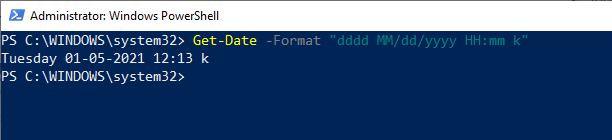
Let see an example to retrieve the date and time in a .NET format specifier using the following – Format parameter and several .NET format specifiers:
- Get-Date -Format “dddd MM/dd/yyyy HH:mm k”
Optional Format list
| Date | |
|---|---|
| d | returns short date pattern |
| D | returns long date pattern |
| f | returns full date/time pattern (short time) |
| F | returns full date/time pattern (long time) |
| g | returns general date/time (short time) |
| G | returns general date/time (long time) |
| m or M | returns month day pattern |
| o | returns round-trip date/time pattern |
| r or R | returns RFC1123 pattern |
| s | returns sortable date/time pattern; conforms to ISO 8601 |
| u or U | returns sortable date/time pattern |
| y or Y | returns year month pattern |
| Time | |
|---|---|
| t | returns short time pattern |
| T | returns long time pattern |
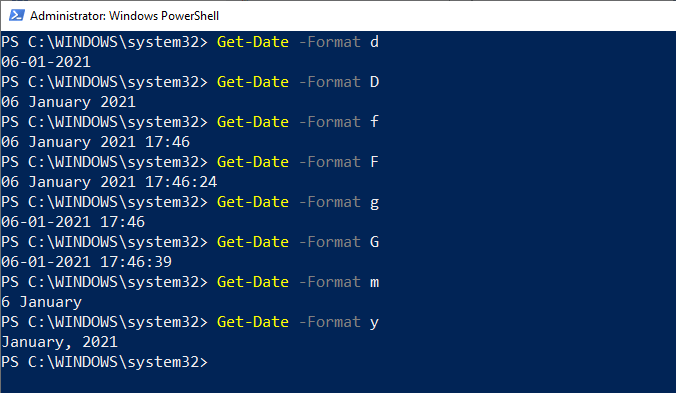
Let’s apply be following format one by one and see their output:
- Get-Date -Format d
- Get-Date -Format D
- Get-Date -Format f
- Get-Date -Format F
- Get-Date -Format g
- Get-Date -Format G
- Get-Date -Format m
- Get-Date -Format y
Leave a Reply