The For loop is also known as a ‘For‘ statement in a PowerShell. This loop executes the statements in a code of block when a specific condition evaluates to True. This loop is mostly used to retrieve the values of an array.
Syntax of For loop
for (<Initialization>; <Condition or Test_expression>; <Repeat>)

{

   Statement-1

   Statement-2

   Statement-N

}
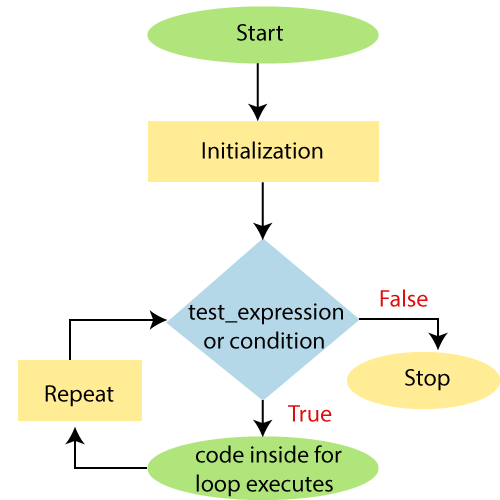
In this Syntax, the Initialization placeholder is used to create and initialize the variable with the initial value.
The Condition placeholder in a loop gives the Boolean value True or False. PowerShell evaluates the condition part each time when this loop executes. When it returns a True value, the commands or statements in a command block are executed. The loop executed its block until the condition become false.
The Repeat placeholder in a loop denotes one or more commands which are separated by commas. It is used to modify the value of a variable which is checked inside the Condition part of the loop.
Flowchart of For loop
Examples
Example1: The following example describes how to use a ‘for‘ loop in PowerShell:
for($x=1; $x -lt 10; $x=$x+1)

>>  {

>> echo $x

>>     }
Output:
1
2
3
4
5
6
7
8
9
In this example, the variable $x is initialized to 1. The test expression or condition $x less than 10 is evaluated. Since 1 less than 10 is true, the statement in for loop is executed, which prints the 1 (value of x).
The repeat statement $x=$x+1 is executed. Now, the value of $x will be 2. Again, the test expression is evaluated to true, and the statement in for loop is executed and will print 2 (value of $x). Again, the repeat statement is executed, and the test expression $x -lt 10 is evaluated. This process goes on until $x becomes 9. When the value of x becomes 10, $x < 10 will be false, and the ‘for‘ loop terminates.
Example2: The following example describes the loop which prints the string values of an array in PowerShell:
PS C:\> $arrcolors = "Red","Orange","Green","White","Blue","Indigo","black","Violet"

PS C:\> for($i=0; $i -lt $arrcolors.Length; $i++)

>>  {

>> $arrcolors[$i]

>>     }
Output:
Red
Orange
Green
White
Blue
Indigo
black
Violet
Example3: The following example of for loop displays the same value of variable repeatedly until you press the key: ‘ctrl+C‘ in PowerShell.
PS C:\> $j = 10

PS C:\> for (;;)

>> {

>>     echo $j

>> }
Output:
10
10
10
10
10
10........................
Example4: The following example prints the even and odd number from 1 to 30 in a table form.
PS C:\> for($i=1;$i -le 30;$i++){

>> if($i -le 1)

>> {

>> echo "Even   -   Odd"

>>}

>> $res=$i%2

>> if($res -eq 0)

>> {

>> echo "  $i          "

>> }else

>> {

>> echo "           $i"

>> }

>> }
Output:
Even   -   Odd
                1
  2
                3
  4
                5
  6
                7
  8
                9
  10
                11
  12
                13
  14
                 15
  16
                 17
  18
                 19
  20
                 21
  22
                 23
  24
                 25
  26
                  27
  28
                  29
  30
Leave a Reply