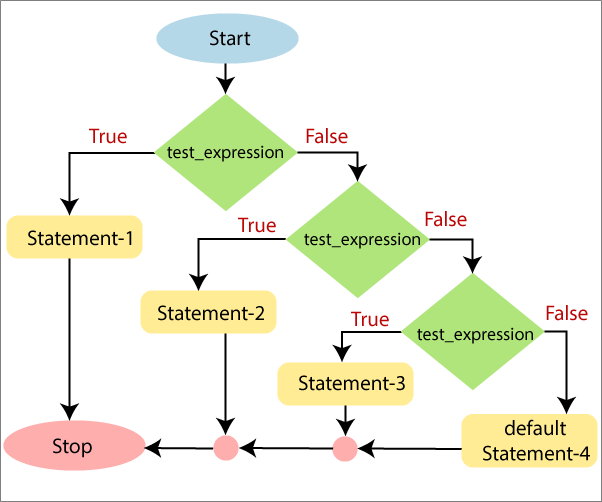
This type of statement is also known as ‘Else-if‘ ladder. It is useful when you want to check more than one condition within a code.
If the condition of any ‘If‘ block is True, then the statements associated with that block are executed. If none of the conditions are True, then the statements inside default else block are executed.
Syntax of Else-if Statement
if (test_expression 1)

    {

         Statement-1

         Statement-2.......

         Statement-N

     }

else if (test_expression 2)

            {

               Statement-1

               Statement-2.......

               Statement-N

            }

               ... ... ...

           else if (test_expression N)

                      {

                             Statement-1

                      Statement-2.......

                             Statement-N

                       }

else

{

    Statement-1

    Statement-2.......

    Statement-N

}
Flowchart of Else-If Statement
Examples
The following examples describe how to use the Else-If statement in PowerShell:
Example 1: In this example, we check a number is positive, negative, or zero.
PS C:\> $a=0

PS C:\> if ($a -gt 0)

>> {

>> echo "Number is positive"

>> } elseif($a -lt 0)

>> {

>> echo "Number is negative"

>> } else

>> {

>> echo " Number is zero"

>> }
Output:
Number is zero
Example 2: In this example, we find the grade of the student according to its percentage.
PS C:\> $math=80

PS C:\> $science=82

PS C:\> $english=75

PS C:\> $computer=90

PS C:\> $hindi=86

PS C:\> $total=$math+$science+$english+$computer+$hindi

PS C:\> $a=$total/500

PS C:\> $percentage=$a*100

PS C:\> if(($percentage -gt 90) -and ($percentage -le 100))

>> {

>> echo "Grade A"

>> } elseif(($percentage -gt 80) -and ($percentage -le 90))

>> {

>> echo "Grade B"

>> }elseif(($percentage -gt 70) -and ($percentage -le 80))

>> {

>> echo "Grade C"

>> }elseif(($percentage -gt 60) -and ($percentage -le 70))

>> {

>> echo "Grade D"

>> }elseif(($percentage -gt 50) -and ($percentage -le 60))

>> {

>> echo "Grade E"

>> }else{ echo "Fail"}
Output:
Grade B
Example 3: In this example, we check the greatest number among the three variables.
PS C:\> $a=10

PS C:\> $b=20

PS C:\> $c=30

PS C:\> if(($a -gt $b) -and ($a -gt $c))

>> { echo "The value of Variable 'a' is greater than the value of variable 'b' and 'c'."

>> }elseif(($b -gt $a) -and ($b -gt $c))

>> { echo "The value of Variable 'b' is greater than the value of variable 'a' and 'c'."

>> }elseif(($c -gt $b) -and ($c -gt $a))

>> { echo "The value of Variable 'c' is greater than the value of variable 'a' and 'b'."

>> }else

>> { echo " The value of all the three variables 'a', 'b', and 'c' are equal."

>> }
Output:
The value of Variable 'c' is greater than the value of variable 'a' and 'b'.
Leave a Reply