When we need to run a loop at least once, then we use the Do-while loop in a PowerShell.
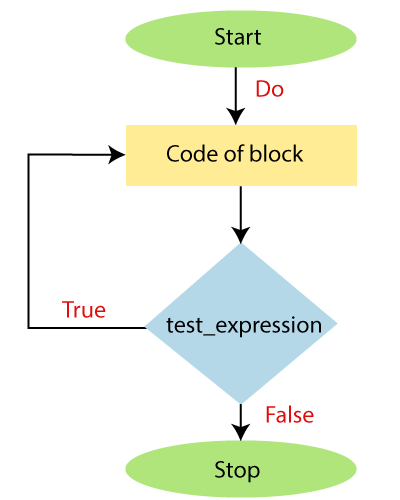
The Do-While loop is a looping structure in which a condition is evaluated after executing the statements. This loop is also known as the exit-controlled loop.
The do-while loop is the same as while loop, but the condition in a do-while loop is always checked after the execution of statements in a block.
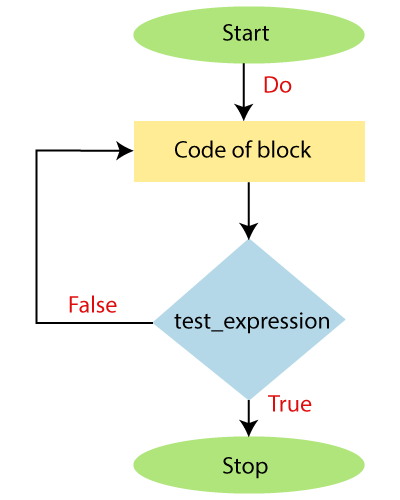
The Do keyword is also used with the ‘Until‘ keyword to run the statements in a script block. Like a Do-while loop, the Do-until loop also executes at least once before the condition is evaluated. The Do-Until loop executes its statements in a code block until the condition is false. When the condition is true, the loop will terminate.
We can use the flow control keywords such as Break and Continue in a Do-while or Do-until loop.
Syntax
The following block shows the syntax of Do-while loop:
Do

{

        Statement-1

        Statement-2

        Statement-N

} while( test_expression)
The following block shows the syntax of Do-until loop:
Do

{

        Statement-1

        Statement-2

        Statement-N

} until( test_expression)
Flowchart of Do-While loop
Flowchart of Do-Until loop
Examples
The following examples describe how to use the Do-while and Do-until loop in the PowerShell:
Example1: In this example, we print the values of an integer from 1 to 10.
PS C:\> $i=1

PS C:\> do

>> {

>> echo $i

>> $i=$i+1

>> }while($i -le 10)
Output:
1
2
3
4
5
6
7
8
9
10
Example2: In this example, we will print the values of an array using Do until loop.
PS C:\> $array=1,2,3,4,5,6,7

PS C:\> $i=0

PS C:\> do{

>> echo $array[$i]

>> $i=$i+1

>> } until ($i -eq $array.length)
Output:
1
2
3
4
5
6
7
Example3: In this example, we print the table of 5 by using the Do-while loop.
PS C:\> $table=5

PS C:\> $i=1

PS C:\> do

>> {

>> echo " $table * $i = $res"

>> $i=$i+1

>> }while($i -le 10)
Output:
5 * 1 = 5
5 * 2 = 10
5 * 3 = 15
5 * 4 = 20
5 * 5 = 25
5 * 6 = 30
5 * 7 = 35
5 * 8 = 40
5 * 9 = 45
5 * 10 = 50
In this example, we have printed the multiplication table of 5 using a Do-while loop. First, we have created and initialized a variable $table and $i with the values 5 and 1 respectively. Then we have written a do-while loop.
In a loop, we have an echo command that will print the result of $res, which stores the multiplication of $table * $i.
Each time, the value of the variable $i is increased by 1, and the condition is checked. When the value of variable $i becomes 11, the condition becomes false, and the loop is terminated.
Leave a Reply