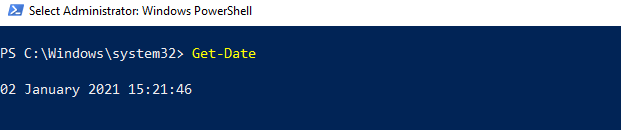
The command Get-Date returns the current date and time of the system, and the result is shown in the form of long-date and long-time formats.
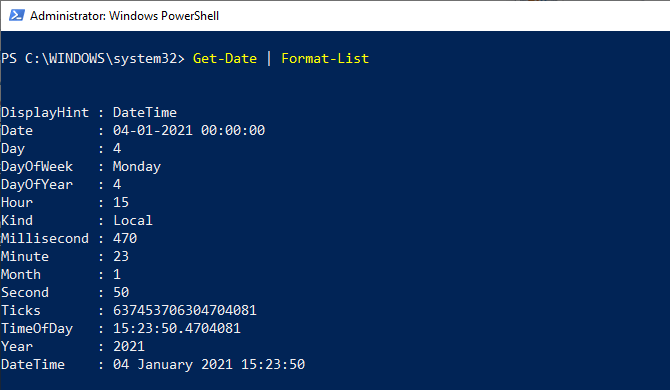
If we use a Format-List cmdlet with Get-Date, we will see the full information that returns various dates and time formats. The command Get-Date returns a DateTime object. Let see the output of using the Get-Date | Format-List cmdlet:
- Get-Date | Format-List
DisplayHint
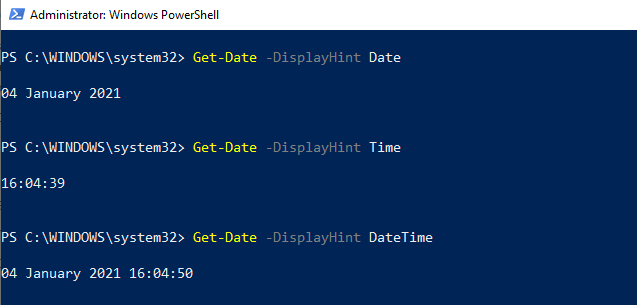
The DisplayHint parameter defines the type of information we want to display on the screen. This parameter also returns the DateTime object; however, it has three different types of formats, including Date, Time, and DateTime. The -DisplayHint parameter uses anyone from Date, Time, or DateTime at a time.
- Date: it only returns the current date value.
- Time: it only returns a current time value.
- DateTime: it returns both the current date and time values.
Let see the output of using the followings cmdlets:
- Get-Date -DisplayHint Date
- Get-Date -DisplayHint Time
- Get-Date -DisplayHint DateTime
Leave a Reply